
The UV index, on your Home Screen
WeatherGO's UV Index widget shows the number and the level at a glance.


Know what your number means
The UV index starts at 0 and climbs with the sun. Here is the standard scale and what each level asks of you.
- 0–2
Low
You can safely enjoy being outside. Wear sunglasses on bright days.
- 3–5
Moderate
Wear a hat and sunglasses, use SPF 30+ sunscreen, and seek shade around midday.
- 6–7
High
Add a long-sleeved shirt and pants when practical, on top of hat, sunglasses, SPF 30+ and shade.
- 8–10
Very high
Limit time outside between 10 a.m. and 4 p.m. A shirt, hat and sunscreen are a must.
- 11+
Extreme
Same care as very high. White sand and other bright surfaces reflect UV and can double it.
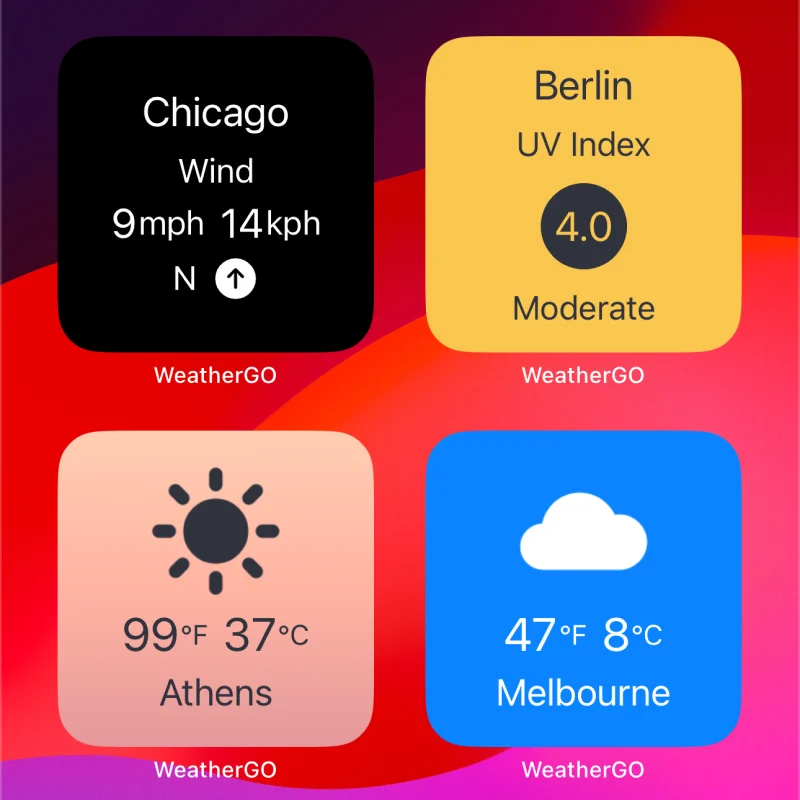
The two widgets above are real WeatherGO readings for Berlin. Scale and guidance from the World Health Organization and the US EPA. General information, not medical advice.
Read it without opening the app
The UV Index widget sits with your other WeatherGO widgets, like wind and temperature, and says three things.
- The city
Up top, the place the reading is for. Change it any time in Edit Widget.
- The number
The UV index for that city, big and centered in a dark circle.
- The level
The word underneath, like Low or Moderate, so you never have to remember the scale.
Make it match your Home Screen
Long press any WeatherGO widget and choose Edit Widget to set the city, the weather source and the colors.

WeatherGO WeatherGO WeatherGO WeatherGO
Six weather sources to pick from: Apple Weather, Visual Crossing, Open Meteo, Tomorrow.io, Open Weather and Pirate Weather.

Check the sun before you head out.
Free on the App Store
UV index app questions
- Does WeatherGO have a UV index widget?
Yes. The UV Index widget sits on your Home Screen and shows a city, its UV index in a dark circle, and the level, like Low or Moderate.
- How do I add a WeatherGO widget to my Home Screen?
Long press on your Home Screen, tap the "+" button, and search for WeatherGO. Choose from a variety of widget sizes for both Home Screen and Lock Screen.
- Can I change the city or colors on the UV widget?
Yes. Long press on any WeatherGO widget and choose "Edit Widget" to change the city, weather source, and foreground/background colors.
- Where does the UV reading come from?
From the weather source you pick for the widget. WeatherGO lets you choose from six providers: Apple Weather, Visual Crossing, Open Meteo, Tomorrow.io, Open Weather, and Pirate Weather.
- What do the UV index levels mean?
On the WHO and US EPA scale, 0 to 2 is Low, 3 to 5 is Moderate, 6 to 7 is High, 8 to 10 is Very high, and 11 or more is Extreme. The higher the number, the faster UV can harm skin and eyes.
- Is WeatherGO free?
Yes. WeatherGO is free on the App Store, with optional in-app purchases.